100 Procreate Dried Herbs Stamps: A Natural Touch for Digital Artists
Why Artists Are Turning to Dried Herb Stamps
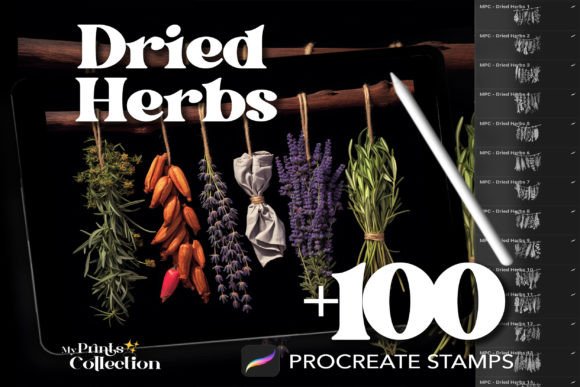
For digital artists using Procreate, adding organic texture and botanical detail can elevate a design from good to extraordinary. The 100 Procreate Dried Herbs Stamps offer a curated collection of high-quality, handcrafted brush sets that bring natural elegance to any digital illustration. Whether you're designing packaging, creating greeting cards, or working on botanical-themed artwork, these stamps provide a seamless way to incorporate the delicate charm of dried herbs.
Each stamp is designed with precision, capturing the intricate veins, textures, and shapes of real dried herbs. This makes them ideal for illustrators, small business owners, educators, and hobbyists looking to add a touch of nature to their digital work without spending hours drawing from scratch.
Common Mistakes When Using Dried Herbs Stamps in Procreate
While the 100 Procreate Dried Herbs Stamps are a powerful tool, there are a few common missteps users often make that can impact the final result. Understanding these pitfalls can help you avoid frustration and get the most out of your stamp set.
1. Skipping the Preview and Sample Test
Some users jump straight into using the stamps without previewing them first. Each herb stamp has a unique shape and density, and not all will work equally well for every project. For example, a large, sprawling sage stamp might overwhelm a minimalist design, while a tiny thyme sprig could get lost in a busy layout.
Better approach: Before committing to a stamp, test it on a separate canvas. Zoom in to check detail clarity and adjust pressure sensitivity to see how it blends with your color palette.
2. Overlooking File Compatibility
Although the Procreate Dried Herbs Stamps come in a .brushset file format, not all versions of Procreate support every brush type. If you're using an older version of the app or an outdated iPadOS, you might run into issues when importing the stamps.
Better approach: Ensure your iPad and Procreate app are updated to the latest versions before downloading. Check the file compatibility details provided by the seller to avoid wasted time and effort.
3. Not Organizing Stamps by Use Case
With 100 stamps in the set, it’s easy to feel overwhelmed. Many users import all stamps at once, leading to a cluttered brush library and slower workflow.
Better approach: Create brush groups based on project types—such as “Botanical Borders,” “Texture Overlays,” or “Herb Bundles.” This helps streamline your creative process and makes it easier to find the right stamp when you need it most.
4. Using Stamps Without Adjusting Blend Modes
Stamps often come with default settings that may not blend well with your background or color scheme. A lavender sprig might look flat or overly saturated if not adjusted properly.
Better approach: Experiment with blend modes like Multiply, Overlay, or Soft Light to make the herb stamp integrate more naturally into your artwork. This small tweak can significantly enhance realism and cohesion.
5. Forgetting About Commercial Use Rights
The 100 Procreate Dried Herbs Stamps offer unlimited personal and commercial use, but some creators aren’t aware of what that entails. For instance, while you can use the stamps in designs for clients or for sale, you cannot resell or redistribute the stamp set itself.
Better approach: Always read the licensing agreement included with your download. This ensures you're using the product within the allowed terms and protects you from potential legal issues.
How to Maximize the Value of Your Stamp Set
Getting the most out of the Procreate Dried Herbs Stamps isn’t just about avoiding mistakes—it’s about enhancing your workflow and creative output. Here are a few practical tips to help you make smarter use of this versatile digital tool.
Customize Stamps to Fit Your Style
Don’t be afraid to modify the stamps. You can adjust size, opacity, and color to match your unique aesthetic. Try layering multiple herb stamps with different blend modes to create depth and dimension in your illustrations.
Use Stamps for Pattern Design
If you're a surface pattern designer or someone creating digital prints, the herb stamps can be used to build seamless, nature-inspired motifs. Combine different herbs and rotate them slightly to create organic, repeating patterns that feel handcrafted.
Incorporate Into Branding and Packaging
Entrepreneurs and small business owners can use the stamps to enhance product packaging, labels, or social media visuals. A soft touch of dried rosemary or oregano can evoke a rustic, artisanal feel—perfect for herbal teas, natural skincare, or organic food brands.
What to Check Before Downloading
Before purchasing or downloading the 100 Procreate Dried Herbs Stamps, there are a few key points to verify to ensure a smooth experience:
- File Format: Confirm that the set is in .brushset format and compatible with your version of Procreate.
- Download Instructions: Make sure you understand how to import the brushes into your app—most sellers provide a step-by-step guide.
- License Type: Check whether the set allows for personal and commercial use, and if there are any restrictions on resale or redistribution.
- Device Compatibility: Ensure your iPad supports the brush features included in the set, especially if you're using an older model.
Final Thoughts
The 100 Procreate Dried Herbs Stamps are more than just a digital tool—they’re a creative resource that brings nature into your digital illustrations with ease and elegance. By avoiding common mistakes and using the stamps thoughtfully, you can unlock new levels of detail and professionalism in your work.
Whether you're a beginner looking to enhance your first digital illustration or a seasoned designer adding texture to a client project, these stamps offer a flexible, high-quality solution that grows with your creativity. Take the time to explore, experiment, and personalize your use of the stamps, and you'll find they become a go-to asset in your Procreate toolkit.