175 Procreate Chibi Summer Stamp: A Must-Have for Digital Artists
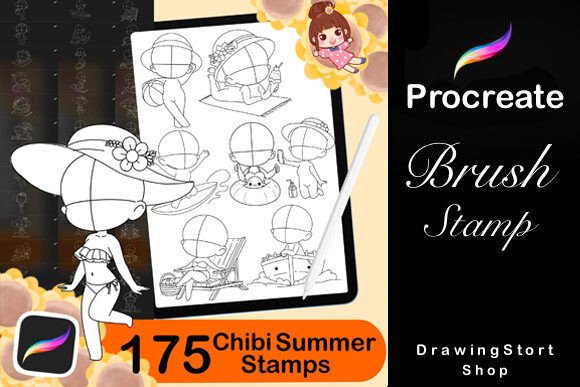
For digital artists, illustrators, and content creators who use Procreate, the 175 Procreate Chibi Summer Stamp set is a powerful toolkit that simplifies character creation. Whether you're designing for social media, digital stickers, or personal art projects, this stamp collection gives you the tools to create adorable chibi characters with minimal effort. It includes a variety of summer-themed stamps, such as beach poses, sea-related accessories, and seasonal expressions that are perfect for capturing the spirit of summer in your artwork.
Why Artists Choose the 175 Procreate Chibi Summer Stamp
This stamp set is designed specifically for use in the Procreate app on iPad, making it a convenient and efficient tool for digital artists. The set includes:
- 60 Chibi Summer Stamps
- 15 Chibi Eye Stamps
- 50 Male Hair Styles
- 50 Female Hair Styles
Together, these elements allow for a wide range of customization. You can mix and match poses, expressions, and hairstyles to create unique characters that fit your creative vision. Whether you're illustrating a summer-themed story or designing digital assets for a brand, this set offers flexibility and speed without sacrificing quality.
Common Mistakes When Using the 175 Procreate Chibi Summer Stamp
While the 175 Procreate Chibi Summer Stamp is a fantastic resource, there are some common pitfalls users encounter that can affect their results. Being aware of these issues can help you make the most of the set and avoid frustration.
1. Assuming All Stamps Are Automatically Compatible
Some artists assume that all stamps will work seamlessly within their existing Procreate workflow. However, not all stamp brushes are created equal. Some may require adjustments in size, opacity, or blending mode to integrate well with your illustration style.
Better approach: Test each stamp in a new layer before committing to your final artwork. Adjust settings like pressure sensitivity and brush dynamics to ensure consistency in line weight and texture.
2. Overlooking the Importance of Layer Management
When using multiple stamps—especially when combining facial expressions, poses, and accessories—it’s easy to end up with a cluttered layer stack. This can slow down your workflow and make editing more difficult.
Better approach: Organize your layers by category (e.g., face, body, clothing, background). Use layer labels and groups to keep track of each element, especially when working on complex scenes with multiple characters.
3. Ignoring the Value of Customization
Many users apply stamps directly without modifying them. While the stamps are designed to be plug-and-play, they become much more powerful when you take the time to tweak them.
Better approach: Use the smudge tool or custom brushes to blend stamp elements into your artwork. Resize, rotate, or flip stamps to create variations and avoid repetitive designs.
What to Check Before Downloading or Using the Set
Before purchasing or downloading the 175 Procreate Chibi Summer Stamp set, it’s important to verify a few key details to ensure it meets your needs.
- Compatibility: Confirm that the set is optimized for Procreate and compatible with your iPad model and stylus.
- File Format: Most stamp sets come as .brushset or .zip files. Make sure you know how to import them into Procreate to avoid unnecessary setup issues.
- License Type: Some stamp sets are for personal use only, while others allow commercial use. Check the licensing agreement to ensure you're using the set appropriately.
- Preview Images: Look at sample artwork created with the set. This gives you a realistic idea of how the stamps perform and whether they align with your artistic style.
How Misuse Can Impact Your Results
Improper use of the 175 Procreate Chibi Summer Stamp can lead to several issues:
- Reduced Quality: Using stamps at incorrect resolutions or stretching them too far can result in pixelation or distortion.
- Unprofessional Presentation: Repeating the same stamp across multiple illustrations can make your work look generic.
- Wasted Time: Poor layer organization or incompatible brushes can slow down your workflow and make editing more frustrating.
To avoid these issues, always take the time to understand the tools you're using and how they integrate into your process. The goal is to enhance your creativity, not limit it.
Maximizing the Potential of Your Stamp Set
To get the most out of the 175 Procreate Chibi Summer Stamp, consider the following tips:
- Combine with Other Tools: Don’t rely solely on stamps. Use them as a base and build upon them with custom brushwork and textures.
- Create Variations: Flip, rotate, and colorize stamps to create different expressions and poses without needing additional assets.
- Use Color Consistency: Apply a unified color palette across all your stamped elements to maintain visual harmony.
- Save Custom Combinations: Once you’ve created a unique character or pose using multiple stamps, save it as a custom brush or template for future use.
Final Thoughts
The 175 Procreate Chibi Summer Stamp is a versatile and valuable tool for artists who want to create charming, summer-themed chibi characters quickly and efficiently. By understanding how to use the set properly and avoiding common mistakes, you can unlock its full potential and elevate your digital art. Whether you're a hobbyist, a small business owner creating branded content, or a professional illustrator, this stamp set can streamline your workflow and inspire your creativity.