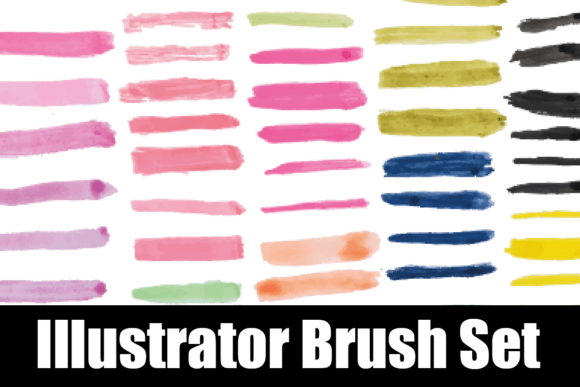
Enhance Your Designs with a Watercolor Illustrator Brush Set
A Watercolor Illustrator Brush Set opens up a world of soft, organic textures that elevate digital illustrations and graphic design projects. Whether you're crafting a brand identity, designing editorial layouts, or developing engaging social media content, these brushes bring a tactile, artistic quality that stands out in today’s clean, digital landscape. The ability to integrate watercolor elements seamlessly into vector-based work makes this set an essential tool for designers seeking both versatility and visual richness.
Why Watercolor Illustrator Brush Sets Matter
Unlike raster-based tools, Illustrator allows for scalable, crisp artwork, and when combined with a watercolor brush set, it delivers painterly effects without sacrificing quality. This blend of traditional aesthetics and digital precision supports a wide range of creative applications—from logo design to packaging—where authenticity and warmth are key. Designers can layer textures, build depth, and simulate real brushstrokes, all while maintaining full control over color, opacity, and composition.
Practical Applications Across Design Disciplines
From branding to digital marketing, a watercolor vector brush set enhances visual storytelling across multiple platforms. Consider these applications:
- Brand Identity: Add subtle watercolor backgrounds or pattern accents to logos, stationery, and brand collateral for a refined, artisanal feel.
- Marketing Materials: Create eye-catching flyers, banners, and email headers with soft, organic edges that stand out without overwhelming the message.
- Social Media Graphics: Use watercolor textures to enhance posts, stories, and carousels, giving them a handcrafted, approachable aesthetic.
- Web and UI Design: Incorporate watercolor overlays or dividers in web layouts to guide visual hierarchy and add artistic depth.
Designing with a Watercolor Vector Brush Set
When working with a Watercolor Illustrator Brush Set, start by experimenting with opacity and blending modes to achieve the right balance between texture and clarity. Since these brushes are often based on scanned watercolor swatches, they bring natural variation and depth that can enhance a design’s emotional resonance. Pair them with clean typography and a cohesive color palette to maintain professionalism while adding visual interest.
For best results:
- Test brushes at different scales to ensure they remain crisp and visually effective in both print and digital formats.
- Layer textures subtly to avoid overwhelming the composition—use them as background accents or soft dividers.
- Align with brand guidelines by customizing brush colors to match your brand’s existing color palette.
- Combine with vector elements like icons or illustrations to create a unified visual language.
What You Receive – An EPS File for Full Flexibility
Most watercolor vector brush sets come in EPS format, ensuring compatibility with Adobe Illustrator and other vector editing software. This format allows for seamless scalability, making it ideal for both print design and high-resolution digital outputs. Designers can edit individual strokes, adjust color profiles, and integrate the brushes into existing workflows without compromising quality or performance.
Final Thoughts on Creative Design Assets
Incorporating a Watercolor Illustrator Brush Set into your design toolkit not only expands your creative possibilities but also strengthens the visual communication of your projects. Whether you're working on packaging design, editorial layouts, or digital marketing assets, these brushes help bridge the gap between digital precision and artistic expression. By choosing high-quality, well-structured design elements, you ensure your work remains both visually compelling and strategically effective across all touchpoints.