Zodiac Starsign Procreate Brush Stamps: A Practical Tool for Digital Artists and Designers
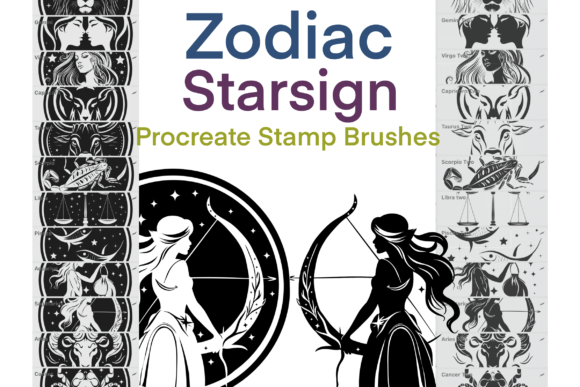
For digital artists, illustrators, and designers working within the Procreate app, having a reliable set of brush stamps can significantly streamline the creative process. The Zodiac Starsign Procreate Brush Stamps offer a curated collection of 24 zodiac-themed stamps, each with two variations—one with a border and one without—plus three additional star stamps. Designed with precision and a hand-drawn aesthetic, these 300 dpi assets are ideal for creators who want to integrate astrology elements into their artwork efficiently and professionally.
Understanding the Zodiac Starsign Procreate Brush Stamps
The Zodiac Starsign Procreate Brush Stamps set is a downloadable resource tailored for use within the Procreate app. Each stamp is a brush preset that can be placed directly onto a canvas with a tap or stylus press, making it easy to incorporate zodiac symbols into illustrations, digital journals, planner pages, or themed artwork. The inclusion of both bordered and borderless versions allows for flexibility in layout and design, whether you're creating minimalist icons or more detailed horoscope visuals.
These stamps are especially useful for creators who frequently work on astrology-related content such as monthly horoscopes, personalized zodiac charts, or thematic branding elements. Because they are hand-drawn, they maintain a unique, organic look that complements a wide range of artistic styles—from whimsical and playful to sleek and modern.
How to Use Zodiac Starsign Procreate Brush Stamps in Your Workflow
Integrating the Zodiac Starsign Procreate Brush Stamps into your creative process can happen at multiple stages, depending on your project's scope and goals. Here’s how they can fit into different phases of your workflow:
- Planning Phase: When conceptualizing a new design or illustration that includes zodiac elements, these stamps can serve as placeholders or reference points. You can quickly sketch out a layout by dropping in the appropriate symbols, adjusting their size and placement before committing to final details.
- Execution Phase: During active creation, the stamps become a time-saving tool. Instead of drawing each zodiac sign from scratch, simply select the corresponding brush stamp. This is especially helpful when working on a series or batch of related illustrations, such as a set of horoscope cards or zodiac-themed social media posts.
- Post-Production Phase: If you're revising or enhancing existing artwork, the stamps can be layered over or under other elements to add thematic consistency. You can adjust opacity, color, or blending modes to ensure the zodiac signs harmonize with the rest of your composition.
Integration with Other Tools and Platforms
The Zodiac Starsign Procreate Brush Stamps are designed to work seamlessly within the Procreate ecosystem, but their utility doesn’t stop there. Once exported from Procreate, stamped artwork can be imported into other platforms such as Adobe Photoshop, Illustrator, or Canva for further refinement or integration into larger design systems. This makes them a versatile component for creators who use a multi-app workflow or collaborate with others using different software.
Additionally, if you're a content creator or educator who shares process videos or tutorials, these stamps can help maintain a consistent visual theme across your materials. Whether you're illustrating a zodiac-based lesson plan, designing a tarot deck, or crafting a digital planner, the stamps provide a cohesive visual language that enhances brand recognition and user experience.
Practical Implementation Tips
Here are several ways to get the most value from the Zodiac Starsign Procreate Brush Stamps in your daily creative practice:
- Organize Your Brush Library: After importing the stamps into Procreate, assign them to a dedicated brush folder or group labeled “Zodiac” or “Astrology.” This makes them easy to locate and prevents them from getting lost among your other brushes.
- Customize Stamp Settings: Experiment with brush settings like pressure sensitivity, opacity, and size dynamics to make the stamps more responsive to your stylus or finger input. This can give your stamped elements a more dynamic and expressive feel.
- Use Layer Management: Place each zodiac symbol on its own layer so you can edit, reposition, or animate them independently. This is especially useful for digital planners or interactive content where elements might need to be toggled on or off.
- Combine with Other Assets: Layer the zodiac stamps with other brush textures, icons, or fonts to build more complex compositions. For example, pairing a zodiac sign with a corresponding planet or element illustration can add depth and storytelling to your work.
- Batch Export for Consistency: If you're creating a series (e.g., monthly horoscope templates), use the same stamp variations and settings across all pieces to maintain a unified look and feel.
Ensuring Quality and Long-Term Usability
Because the Zodiac Starsign Procreate Brush Stamps are high-resolution (300 dpi), they are suitable for both digital and print applications. Whether you're designing for screen-based content or preparing physical prints like greeting cards or stickers, the clarity and detail of the stamps hold up well across formats.
For long-term use, consider backing up your brush library regularly and keeping the original stamp files in a secure folder. This ensures you can re-import them if you switch devices or need to reset your Procreate settings. It's also a good idea to periodically review your brush collection to remove any unused or outdated stamps, which helps keep your workflow streamlined.
Real-World Use Cases
Let’s look at a few practical scenarios where the Zodiac Starsign Procreate Brush Stamps can make a meaningful impact:
- Horoscope Content Creators: Bloggers or social media influencers who publish weekly or monthly horoscopes can quickly insert relevant zodiac signs into their visuals without needing to redraw them each time. This consistency helps build a recognizable brand identity.
- Digital Planners and Journals: Designers creating printable or digital planners can use the stamps to mark zodiac dates, create themed spreads, or personalize monthly layouts. The borderless versions are particularly useful for minimalist designs.
- Brand Identity and Packaging: Entrepreneurs launching astrology-themed products can integrate the zodiac symbols into logo concepts, packaging labels, or promotional materials. The hand-drawn style adds a personal, artisanal touch.
- Art Journaling: For personal or therapeutic art journaling, these stamps can be used to mark moods, intentions, or reflections tied to specific zodiac signs, offering a creative way to track emotional or spiritual growth.
Final Thoughts on Workflow Integration
Incorporating the Zodiac Starsign Procreate Brush Stamps into your digital art workflow is a practical way to enhance efficiency without sacrificing quality or creativity. By reducing the time spent drawing recurring elements, you free up mental space to focus on composition, storytelling, and the unique aspects of your project that truly set it apart.
Whether you're a seasoned illustrator or a hobbyist exploring digital art for the first time, these stamps provide a reliable, high-quality resource that can grow with your creative journey. With thoughtful organization, customization, and integration into broader design systems, the Zodiac Starsign Procreate Brush Stamps become more than just a tool—they become a consistent part of your creative process.